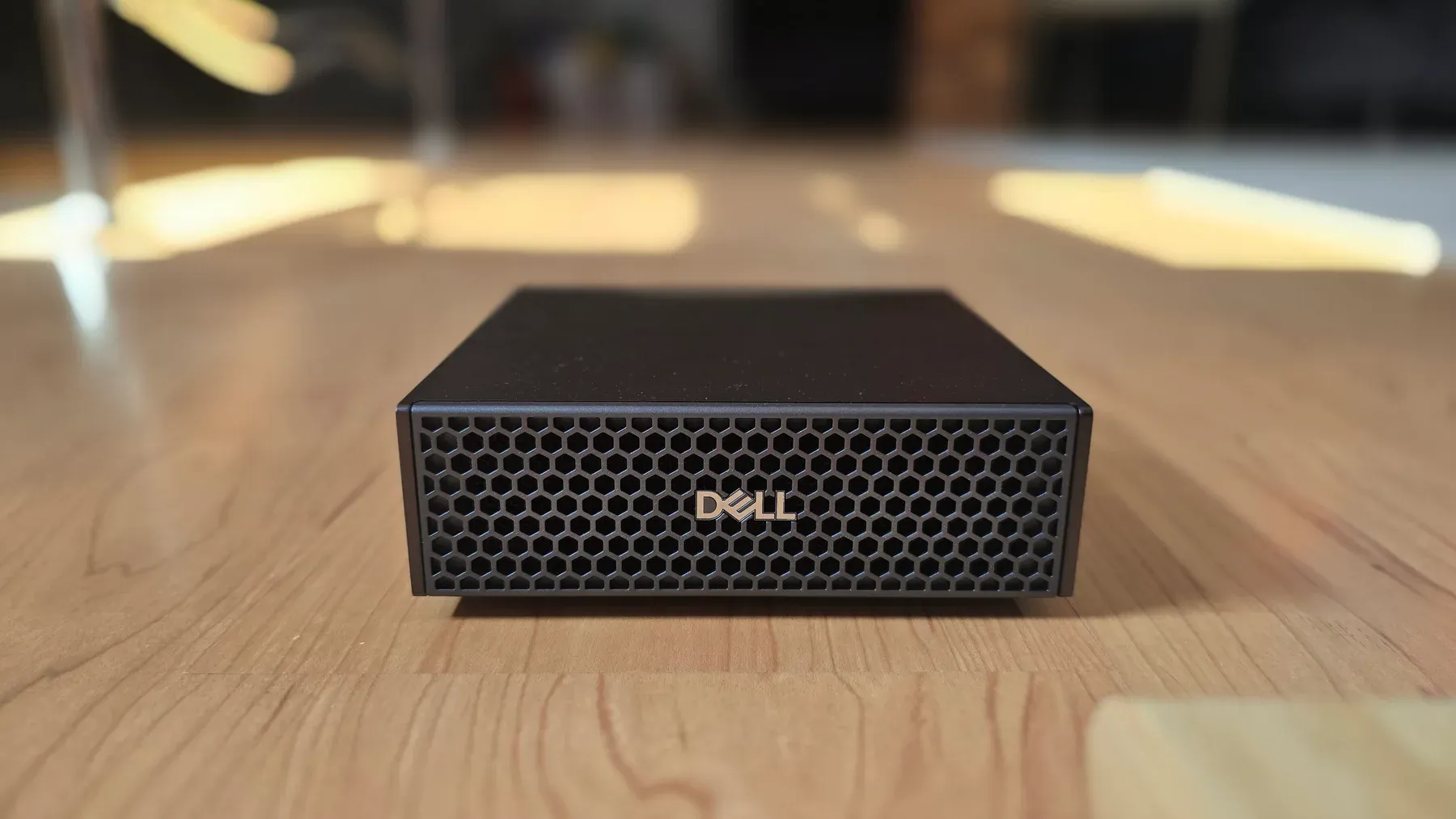
Dell Pro Max with GB10 review unit on the Salt Data test desk.
At its heaviest model load, our Dell Pro Max with GB10 held an 86.7 GB DeepSeek V4 Flash quant with a 100,000-token context configuration and Open WebUI still running. Median host memory use reached 107.9 GiB. The 32-minute run completed every request, averaged 113 W at the wall, and showed no active GPU throttle flag.
The most useful workload consumed much less memory. A Qwen3.6 GGUF endpoint handled a synthetic 12-document HR assistant in 1.516 seconds median, passed every retrieval, answer, citation, and structured-output check, and left more than 93 GiB available. A separate Qwen NVFP4 server then handled 956 requests without a failure during a 30-minute mixed load.
Producing those results required a clean DGX OS installation, Arm64-aware containers, source builds for some runtimes, pinned launch parameters, and second-by-second telemetry. Large models consumed nearly all of the Linux-visible 121 GiB. Step-3.7 loaded but returned unsuitable output with the available templates, and a previously working vLLM recipe did not relaunch cleanly during one session.
We would use this system for local AI engineering, private document workloads, and small-batch inference where data locality and model capacity justify dedicated hardware. An in-house IT team or capable external partner must deploy, configure, secure, and integrate the service. The out-of-box experience alone is not enough for a non-technical buyer to operate it as a useful business AI service. Once configured, the staff experience can be as simple as a normal chat interface or internal application.
Review unit and software configuration
The Dell Pro Max with GB10 provided for review was model FCM1253. Its configuration paired a 20-core NVIDIA GB10 Grace CPU with an NVIDIA Blackwell GPU, 128 GB LPDDR5X memory at 273 GB/s, DGX OS 7, and a 280 W USB-C adapter. Connectivity included three USB 3.2 Gen 2x2 Type-C ports with DisplayPort alternate mode, HDMI 2.1b, 10GbE, two 200 Gbps QSFP ports through ConnectX-7, Wi-Fi 7, and Bluetooth 5.4, as documented in the technical sheet.
Our unit had the 4 TB TLC NVMe option. We used the following software and hardware configuration for the measurements:
- Ubuntu 24.04.4 LTS with kernel
6.17.0-1021-nvidia - DGX release
7.5.0 - NVIDIA driver
580.159.03 - CUDA toolkit
13.0, withnvcc 13.0.88 - Docker
29.2.1and NVIDIA Container Toolkit1.19.1 - 121 GiB total memory reported by Linux
- 4 TB NVMe with SMART health passed and 0 percent wear reported
- Three-year next-business-day support
Salt Data has this configuration listed at EUR 4,990 excluding VAT, and it is currently in stock. Contact us here to contact Salt Data about the Dell Pro Max with GB10 for more details.
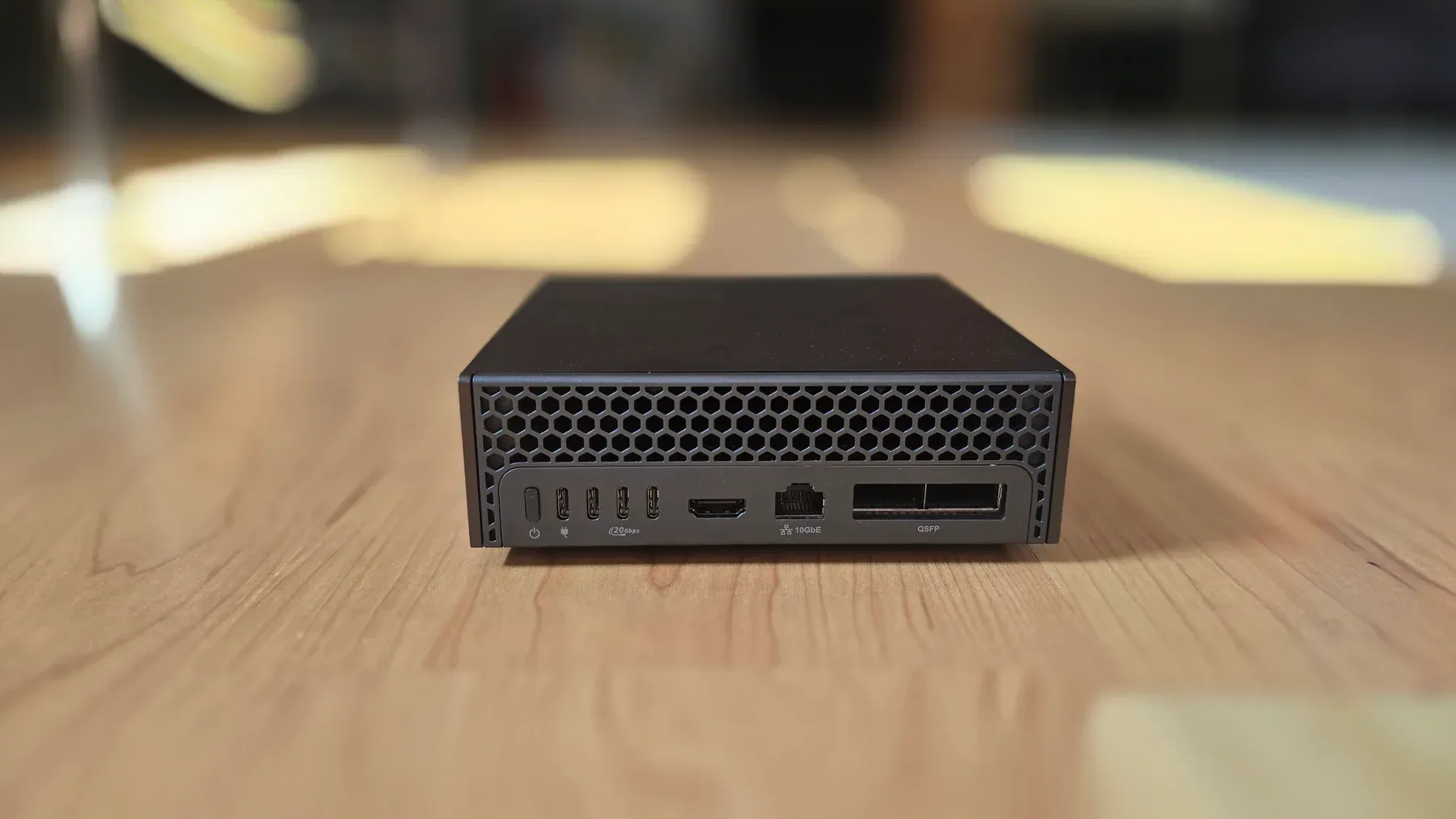
Rear connectivity includes three USB-C data ports, HDMI, 10GbE, and two ConnectX-7 QSFP ports.
How we tested it
We measured interactive inference, a private document workflow, large-model capacity, and cooling under sustained load. The results below show what each tested setup achieved. The figures apply to the named model and configuration and do not establish a universal model ranking.
We kept the OS, driver, firmware, packages, container images, and model files unchanged throughout these measurements. A one-second logger recorded host memory, swap, GPU utilisation, GPU-domain power, clocks, ACPI thermal zones, NVMe temperature, GPU throttle flags, and CPU performance-limit counters. A Shelly Plug M Gen3 supplied wall-power data through Home Assistant. Power averages are time-weighted for each workload period.
The model requests measured API reliability, speed, concurrent use, and whether responses were complete and usable. These figures do not rank model intelligence. The private document workflow used 12 synthetic Markdown files, pure-Python BM25 retrieval, and checks for expected answers, citations, valid structured output, and unsupported claims.
Results at a glance
Workload
Qwen3.6 mixed load
Setup
NVFP4, vLLM, 16k context, up to 4 sequences
Result
956/956 requests, 0 failures, 0.162 s median time to first token, 4.187 s median latency
- Median memory
- 88.32 GiB
- Wall power
- 106 W average, 116 W max
Workload
Synthetic HR RAG
Setup
Qwen3.6 Q4_K_XL GGUF, llama.cpp, 4 slots
Result
12/12 retrieval, answer, and citation checks; 1.516 s median latency
- Median memory
- 28.03 GiB
- Manual wall-plug
- 111 W average, 121 W max
Workload
DeepSeek V4 Flash heat-soak
Setup
DS4 q2-imatrix, 100k context, 4 queued clients
Result
36/36 long requests, 14.259 tok/s aggregate, 32 min 19 s under load
- Median memory
- 107.90 GiB
- Wall power
- 113 W average, 122 W max
Workload
Gemma 4 parallel agents
Setup
26B-A4B Q4_K_M GGUF, llama.cpp, 10 slots
Result
10/10 valid SVG tasks at a 1,536-token cap, 145.298 tok/s aggregate
- Median memory
- 28.19 GiB
- Manual wall-plug
- 114 W average, 119 W max
Workload
Synthetic high-power soak
Setup
CUDA FMA load plus 8 host CPU workers
Result
30 minutes, 0 GPU throttle flags, 0 CPU performance-limit events
- Median memory
- 4.42 GiB
- Wall power
- 181 W average, 185 W max
Read each row independently. Qwen covers sustained API serving, the HR assistant covers a small document workflow, DS4 covers a memory-heavy queued service, Gemma covers ten concurrent structured outputs, and the synthetic load covers cooling near 180 W.
Qwen3.6 was the most practical serving profile
We ran nvidia/Qwen3.6-35B-A3B-NVFP4 in a cached vllm/vllm-openai:nightly image. The server used a 16,384-token maximum context, four maximum sequences, FP8 KV cache, ModelOpt quantisation, FlashInfer attention, and a 0.65 memory-utilisation target.
The API was ready after about 301 seconds. With the model loaded and idle, the system used a median 88.20 GiB and drew 35 W from the wall. The 30-minute mixed workload combined repeated four-client brief batches with sequential medium requests. It completed 956 requests and 266,893 output tokens with no HTTP failures. Median time to first token was 0.162 seconds and median end-to-end latency was 4.187 seconds. Median per-request output speed across the complete run was 57.503 tok/s.
The load stayed stable:
- 88.32 GiB median memory used and 33.31 GiB available
- zero swap use
- 93 percent median GPU utilisation
- 67.0 C maximum GPU temperature
- 79.9 C maximum ACPI temperature
- 57.9 C maximum NVMe temperature
- 106 W time-weighted average wall power
- no active GPU throttle flag and no CPU performance-limit event
We then gave the same Qwen server a small Python maintenance task: replace a module in an isolated HR-policy utility and pass four supplied unit tests. The first answer passed all four tests, so no repair prompt was needed. The model replied in 4.871 seconds. This covers one bounded edit with known files and tests.
Reproducing the vLLM setup was unreliable. During the HR test, the cached runtime rejected several MoE backends and the NVFP4 server would not restart. We left image and package versions unchanged and used the proven GGUF server for that task. The NVFP4 setup worked again during the later 30-minute Qwen run.
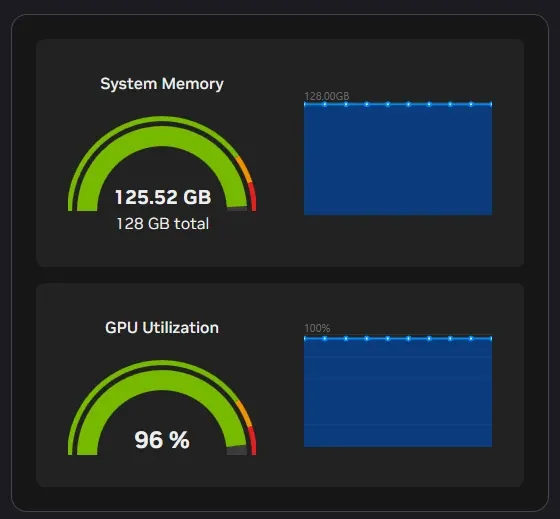
DGX Dashboard exposes unified-memory and GPU-utilisation views. Salt Data used timestamped CLI telemetry for the reported measurements.
The private document workflow is the strongest business result
The HR document assistant ran Qwen3.6 UD-Q4_K_XL through llama.cpp. It used 12 synthetic Markdown documents covering remote work, equipment handling, leave, benefits, onboarding, a payroll job description, and candidate profiles. BM25 selected four snippets for each question. The 12 questions covered policy exceptions, Romanian instructions, missing-evidence refusals, candidate selection, and JSON extraction.
For all 12 questions, retrieval selected the required document, the answer contained the expected facts and citation, and every structured response returned valid JSON. Median latency was 1.516 seconds, p95 latency was 4.816 seconds, median time to first token was 0.132 seconds, and median completion speed was 63.612 tok/s. A four-request burst also completed without errors, with 3.133 seconds median latency and 35.272 tok/s aggregate throughput.
The server used a median 28.025 GiB during the suite and left 93.602 GiB available. That headroom is important for a real deployment, where the same machine may also need OCR, embeddings, a vector database, the web interface, monitoring, and access-control services.
The source set consisted of synthetic Markdown. We did not include scanned PDFs, OCR, a production vector database, document-level permissions, multi-user authentication, prompt-injection controls, or retention policies. A customer-facing deployment still needs representative documents, access controls, evaluation data, and an operator-owned update process.
What the 128 GB pool enables
Large unified memory is the system’s main hardware advantage. Linux exposed 121 GiB to our software after platform reservations. Several tests used most of that budget.
Model path
DeepSeek V4 Flash through DS4
Memory use
86,720,111,488-byte q2-imatrix GGUF; 107.90 GiB median memory used
Observed result
Stable for 32 min 19 s. One worker handled four clients serially, producing 161.787 s median time to first token for queued long requests.
Model path
Nemotron-3-Super 120B-A12B NVFP4
Memory use
75.03 GiB reported model load; about 115.1 GiB host memory used and 4.82 GiB swap resident
Observed result
24.497 tok/s median with one request and 89.552 tok/s aggregate with eight concurrent requests. The first start took 1,995 s including download and load.
Model path
Step-3.7 Flash Q3_K_M
Memory use
Roughly 197B parameters; 96.3 to 96.8 GiB used with eight slots and 1.06 GiB swap
Observed result
25.14 tok/s with one request and 87.63 tok/s aggregate with eight concurrent requests. The official metadata template hid normal answers, while ChatML exposed repetition and self-editing.
Model path
Gemma 4 26B-A4B Q4_K_M
Memory use
Ten 7,168-token slots; 28.19 GiB median memory in the ten-task run
Observed result
10/10 valid SVG outputs at a 1,536-token cap. A 768-token cap produced only 6/10 valid files because four responses were truncated.
DS4 shows the capacity and the queueing cost
DS4 is a specialised inference engine that explicitly supports DeepSeek V4 Flash on CUDA and DGX Spark-class systems. Our q2-imatrix file occupied 86.72 GB and prepared 80.76 GiB of tensor spans. At ctx=100000, the endpoint was ready in 28 seconds from the cached local model and used about 107 GiB at readiness.
We sent 36 long requests from four clients. All requests completed, producing 27,648 output tokens at 14.259 tok/s aggregate. Once an individual request started decoding, per-request speed stayed close to 14.4 tok/s. One worker processed requests serially, so concurrent clients waited. Median time to first token reached 161.787 seconds and median latency reached 214.907 seconds.
The 86.7 GB quant remained stable throughout the 32-minute load. Its serial queue makes it a poor shared interactive service because each client waits for the previous request to finish. Batch jobs, long private analysis, and single-user coding are a better fit.
Nemotron and Step define the upper operating range
vLLM served Nemotron-3-Super with eight 65,536-token slots and strong aggregate throughput. Only about 6.5 GiB remained available while 4.82 GiB of swap was resident. Adding retrieval or document-processing services on the same machine would require a tighter context, fewer slots, a smaller model, or separate infrastructure.
The Step-3.7 Flash Q3_K_M GGUF loaded into an eight-slot llama.cpp server. One request ran at about 26 tok/s, while eight concurrent requests reached about 88 tok/s aggregate. The public model template generated hidden reasoning without visible answers under the configured output limit. Plain ChatML exposed answers, along with self-correction, repetition, and prompt-fragment leakage. The response formatting was unsuitable for a business service in this configuration.
Gemma handled ten local sub-tasks
We configured ten llama.cpp slots for Gemma 4 and issued ten SVG-generation tasks at once. The first attempt limited each task to 768 tokens and yielded six valid SVG files. Four outputs ended before completing the XML. Raising the cap to 1,536 tokens produced ten valid files, 37.337 seconds median latency, and 145.298 tok/s aggregate throughput.
The first attempt shows why structured-output tasks need enough output budget and a validator. An HTTP 200 response only confirmed that the server completed the request; four of those responses still contained incomplete SVG files.
Setup and software experience
The review unit had already been configured by a previous reviewer, and we did not have access to that installation. We restored the device with Dell’s official recovery image from Dell Support. The existing partition layout blocked the DGX OS recovery installer from creating the main Linux partition, so we cleared the stale GPT from the installer shell and reran the recovery. We then completed the initial setup flow as a new user would and configured the system for our review.
After installation, fwupdmgr applied embedded-controller and USB-C power-delivery firmware updates. The next firmware query showed no remaining LVFS updates for the detected devices. The system also reported zero failed systemd units and a healthy NVMe drive.
NVIDIA Sync opened DGX Dashboard and JupyterLab without manual port forwarding after we entered the connection details. Automatic discovery did not succeed in our environment. The Sync terminal also hit a Windows OpenSSH permissions error in its generated ssh_config; repairing that file’s ACL restored terminal access. The machine itself remained reachable during the failure.
The GB10 uses Arm64. Dell’s preinstalled software covers the initial device setup. Buyers should confirm that any applications, containers, drivers, or automation tools they add have compatible Arm64 builds.
DGX Dashboard was useful for quick status checks. We recorded figures from timestamped CLI logs and the external Shelly meter because unified memory changes what nvidia-smi reports, and the stock interfaces exposed no fan RPM sensor. NVIDIA documents the platform’s unified-memory reporting caveat in the DGX Spark User Guide.
Power and thermal behaviour
The settled system drew 23 W from the wall before the DS4 run, with only Open WebUI active. Qwen model-loaded idle averaged 35 W. The Qwen mixed load averaged 106 W, while the DS4 long-generation run averaged 113 W.
Qwen3.6 30-minute mixed load
- Wall power
- 106 W average, 116 W max
- GPU max
- 67.0 C
- ACPI max
- 79.9 C
- NVMe max
- 57.9 C
- Throttle or CPU limit
- No GPU throttle flag or CPU performance-limit event
DS4 32-minute long-generation run
- Wall power
- 113 W average, 122 W max
- GPU max
- 69.0 C
- ACPI max
- 79.9 C
- NVMe max
- 58.9 C
- Throttle or CPU limit
- No GPU throttle flag or CPU performance-limit event
30-minute synthetic high-power load
- Wall power
- 181 W average, 185 W max
- GPU max
- 76.0 C
- ACPI max
- 98.7 C
- NVMe max
- 60.9 C
- Throttle or CPU limit
- No GPU throttle flag or CPU performance-limit event
The synthetic test combined an FMA-heavy CUDA kernel with eight host CPU workers. It held the system near 180 W for exactly 30 minutes. Median GPU utilisation was 96 percent, median GPU temperature was 75.0 C, and median ACPI maximum was 97.9 C. Monitoring showed no GPU throttling caused by temperature or power limits during the test. The CPU performance-limit count stayed zero.
The 98.7 C ACPI value is an internal sensor reading. It is separate from the chassis surface. At the end of the 30-minute load, ambient temperature was 28.0 C, the measured GB10 surface hotspot was 46.0 C, and the power-adapter hotspot was 47.9 C. These spot readings came from a Thermal Master P3. The monitored temperatures plateaued during this run. Thirty minutes cannot establish long-term component life or behaviour in a hotter room.
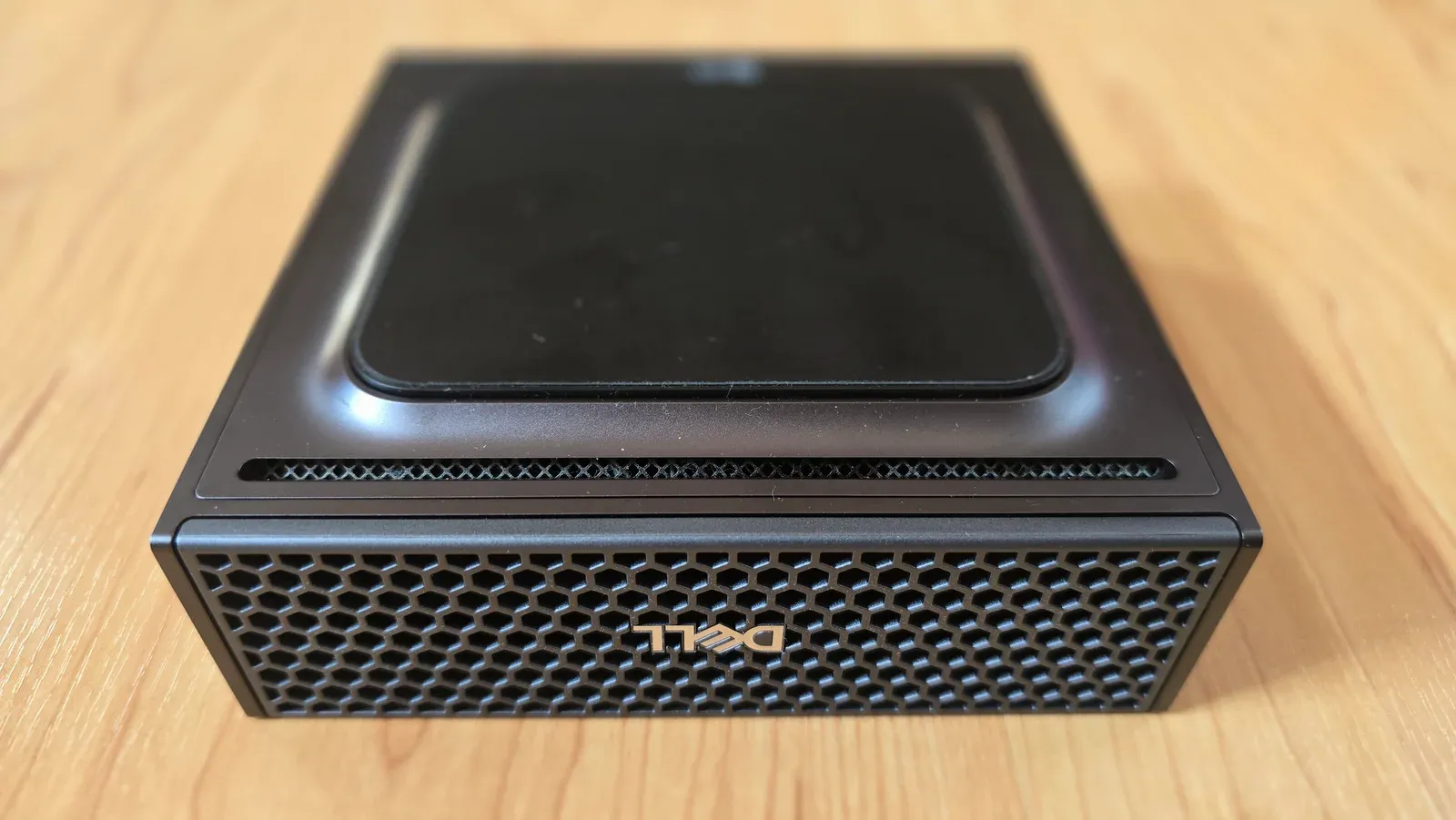
Underside vent and front mesh on the compact GB10 chassis.
Field replacement is limited to the M.2 SSD
Dell’s component map divides the GB10 into the rubber base plate, bottom cover, solid-state drive, and chassis. In the Field Replaceable Unit section, the SSD is the only internal component with a separate replacement procedure. Dell treats the rest of the computer as a complete assembly that excludes the SSD. The socket accepts one M.2 2230 or M.2 2242 drive.
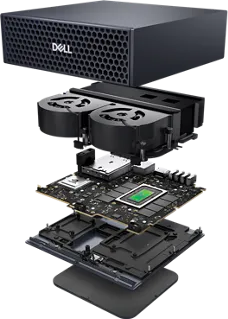
Dell’s exploded view shows the rubber base, bottom cover, SSD, and main computer assembly.
The outer rubber base plate is held by magnetic contacts and lifts away using the gaps on its left and right sides. Under it, four M2x4.4 Torx screws secure the bottom cover to the chassis. Our photo below shows that first stage with the screws exposed.
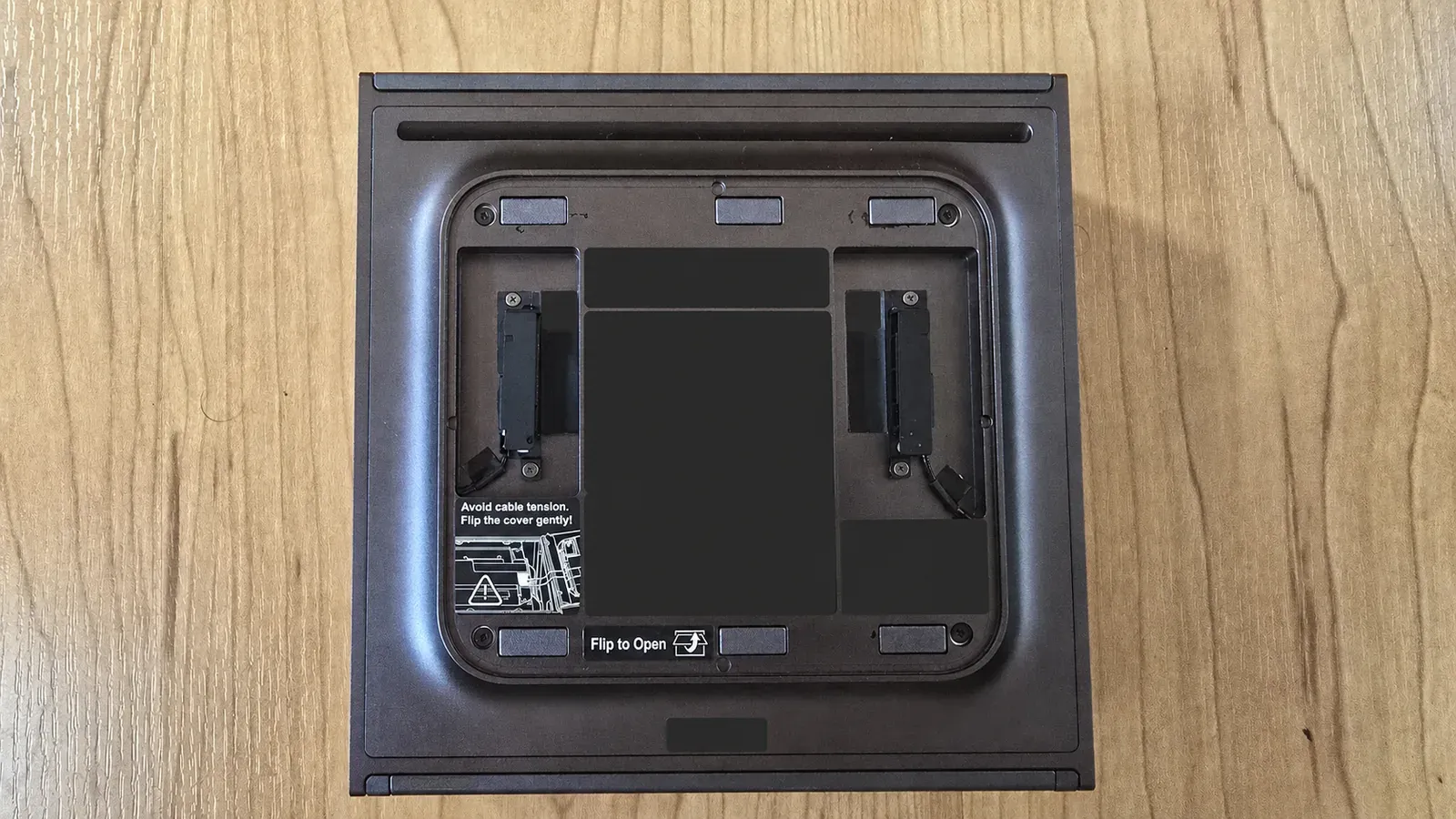
Removing the magnetic rubber base exposes the four Torx screws that secure the bottom cover.
To access the SSD:
- Shut down the system, disconnect power and peripherals, and place it top side down on a clean, flat surface.
- Lift off the magnetic rubber base plate from the side gaps.
- Remove the four M2x4.4 Torx screws from the bottom cover.
- Use a plastic scribe to create a gap between the cover and chassis.
- Gently lift and pivot the cover open. The two antenna cables remain attached, so the cover must move without pulling or tensioning them.
The opened unit exposes the M.2 SSD near the edge of the chassis. Dell secures the drive with one M2x2 screw and may fit thermal pads above and below it. The pads must be handled as part of the replacement procedure.
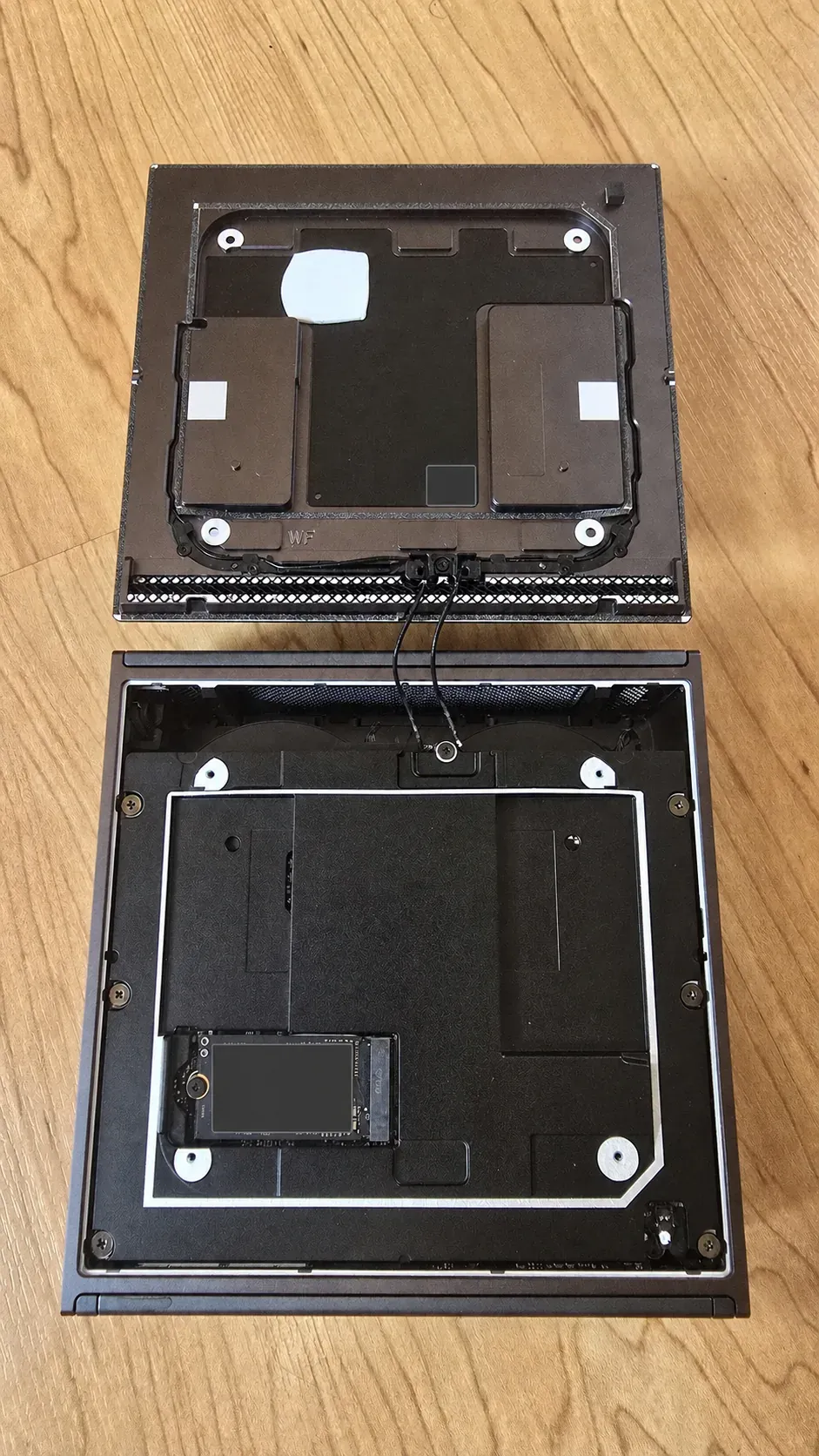
Bottom cover pivoted open with the antenna cables still attached. The M.2 SSD is accessible at the lower left.
Where the purchase makes sense
The GB10 works best as compact, centrally managed inference infrastructure for a medium-sized company. An internal IT team or capable partner can run one or more models behind internal services or OpenAI-compatible APIs, then connect those endpoints to existing business tools, custom applications, automation, RAG systems, or a browser interface such as Open WebUI. The same system can support several application-specific workflows while their combined memory and concurrency remain within its practical capacity.
The business value comes from local control, predictable internal access, and flexibility. A company can keep prompts, documents, and outputs on infrastructure it manages, define how internal applications reach the models, and build interfaces around its own data and operating rules. Our Qwen service completed 956 mixed requests with no HTTP failures. The synthetic HR RAG workflow selected the required source, returned the expected facts and citations, and produced valid JSON for all 12 questions at 1.516 seconds median latency. A four-request burst completed without errors at 3.133 seconds median latency. That server used about 28 GiB and left about 94 GiB available for retrieval, interfaces, and supporting services. The 4 TB local drive also held several large model variants, logs, and outputs without immediate storage pressure.
The key buying question is whether the company has a useful workflow and a clear owner for integration and operations. Once the service is configured, ordinary staff can use it from their PCs through purpose-built internal software or a familiar browser interface. IT or the implementation partner handles the model servers, data connections, permissions, and platform work behind those interfaces.
The GB10 is not a consumer appliance. Dell’s preinstalled software covers the initial device setup, while a business deployment still requires software and model selection, application development or integration, access control, output validation, monitoring, updates, maintenance, and backup. Each production workload needs evaluation with the company’s real data, expected concurrency, latency target, and required model quality.
The business case is weaker when use is sporadic, integration and operations are not funded, or workload demands exceed the system’s resources. Our DS4 configuration processed four clients serially and pushed median time to first token to 161.787 seconds, which is unsuitable for a busy shared chat service. Nemotron left little memory for adjacent services. Workloads that exceed available memory or require sustained high concurrency need larger or distributed infrastructure. Cloud APIs may cost less at low utilisation and remove local platform maintenance. Smaller models that fit on a conventional discrete GPU may deliver higher decode speed or lower acquisition cost.
Operational limits to budget for
- Arm64 packaging: container tags and binary releases must explicitly support
aarch64and the GB10 CUDA stack. - Software changes: vLLM flags, backend support, model revisions, and nightly images can break a previously working launch.
- Usable memory: applications saw 121 GiB, and large services need room for the OS, KV cache, runtime allocations, retrieval, and user interfaces.
- Cold starts: large models can take several minutes to load. Nemotron’s first ready state took about 33 minutes with download included.
- Output validation: successful HTTP responses did not guarantee clean answers or complete structured artifacts.
- Monitoring: unified memory needs host-level monitoring. Stock telemetry exposed no fan RPM.
- Model quality: fit and throughput say nothing about whether a model handles a company’s real documents, languages, exceptions, and tool calls.
Verdict
Salt Data’s verdict is a conditional buy for centrally managed local inference. One GB10 remains useful when the chosen model, quantisation, context, and concurrency fit its 128 GB memory pool. Linux exposed 121 GiB to our software. The synthetic HR RAG service used about 28 GiB and answered all 12 questions with the expected sources, facts, citations, and structured output. The sustained Qwen service used a median 88.32 GiB and completed 956 requests without an HTTP failure. DS4 used a median 107.90 GiB and kept its 86.7 GB model stable for more than 32 minutes. The system completed these workloads without GPU throttling caused by temperature or power limits.
Memory planning must include the model weights, runtime allocations, KV cache, operating system, and any retrieval, interface, monitoring, or access-control services on the same machine. A configuration that technically loads can leave too little capacity for the complete application. One 128 GB unit is therefore a credible platform for appropriately sized models and the workflows we measured. Suitability for another model depends on its actual checkpoint, serving stack, context, and concurrency requirements.
For buyers planning around newer and larger open-weight releases, 256 GB is a useful first cluster tier and may need to go higher. In GB10 terms, that means two or more systems, depending on the selected model, quantisation, and deployment design. NVIDIA documents supported two-to-four-node GB10 cluster layouts and states that two nodes increase combined memory from 128 GB to 256 GB. Distributed serving software must partition the workload across those nodes. Node count alone does not establish model compatibility, latency, or throughput.
We tested one GB10. Demand for review units was high, and Dell could not provide a second unit. Every multi-unit example below comes from the cited external work. Every performance and stability result elsewhere in this review comes from our single review unit.
Plan capacity against the models you expect to run
MiniMax-M3’s official repository specifies about 428B total parameters and 23B active parameters. An independent reproduction on two DGX Spark systems served all 428B parameters without pruning, using a 224 GB W4A16 GPTQ checkpoint split to 112 GB per node with vLLM tensor parallelism over a direct 200G RoCE link. The reproduced configuration used a four-bit KV cache and an INT4 EAGLE-3 drafter, supported a 196K maximum context, and recorded 36.6 tokens per second on JSON output and 31.8 on code in single-stream tests. It left about 9 GB per node for the KV cache and required a pinned, patched software stack. The documented result makes 256 GB plausible for that exact model variant, with limited memory margin and substantial integration work.
GLM-5.2 is a 744B-total, 40B-active mixture-of-experts model. The official vLLM recipe puts NVIDIA’s NVFP4 checkpoint at about 465 GB because the shared experts, attention, embeddings, and early dense layers remain at higher precision. That checkpoint exceeds the nominal memory of two or three GB10 units. Four units provide 512 GB nominally, which leaves little capacity for the runtime and KV cache.
Public GB10 deployments show three different capacity options for GLM-5.2. A two-node recipe uses two-bit MoE expert planes, prunes the expert count from 256 to 208 per layer, and keeps 109 of 114 GiB occupied on each node. It reports a 96K context and 25.8 tokens per second for one stream, using a custom vLLM-Moet branch and several patches. A three-node recipe serves a 469B REAP-pruned NVFP4 derivative at 256K context, with 83.9 to 92.1 GiB allocated per node and about 4.4 tokens per second decode. These are plausible deployments of modified derivatives. Their pruning and quantisation need quality validation against the buyer’s own work.
The clearest route for the full model uses four nodes. A reproducible four-Spark recipe serves the unpruned 744B model from a roughly 372 GB mixed INT4 and INT8 checkpoint, using vLLM tensor parallelism across four systems and direct RoCE links. The author reports up to one million tokens of context, about 22 to 42 tokens per second for one stream, and 103.7 tokens per second across four simultaneous users. This deployment also requires a custom vLLM fork. The published results make four units plausible for an unpruned GLM-5.2 deployment, subject to reproducing the software stack and validating performance and model behaviour.
No credible documented Kimi K3 deployment currently fits within four GB10 systems such as DGX Spark: the official vLLM guidance requires at least eight GB300 GPUs, and the smallest documented experimental GGUF is 528.03 GiB, already above the approximately 484 GiB usable across four nodes before runtime overhead.
One GB10 remains useful for the Qwen, Gemma, Nemotron, Step, and DeepSeek configurations documented in this review, along with appropriately sized RAG systems for legal, financial, HR, and other document-heavy workflows. A two-unit 256 GB cluster can run much larger checkpoints such as the documented full MiniMax-M3 quantisation, although memory margins can be narrow. Current GLM-5.2 deployments point toward three units for pruned derivatives and four units for an unpruned route. Buyers should plan from the exact checkpoint, runtime, context, concurrency, and application services they expect to operate.
Related reading
Hosting a Monitoring Stack - Grafana, InfluxDB, and Telegraf
Deploy a complete self-hosted monitoring stack using Grafana, InfluxDB, and Telegraf with Docker Compose — from installation to your first dashboard.
Managing Docker Across Multiple Servers with Komodo
Deploy Komodo Core with Docker Compose and install Periphery agents on remote servers to manage Docker containers, stacks, and builds from a single dashboard.