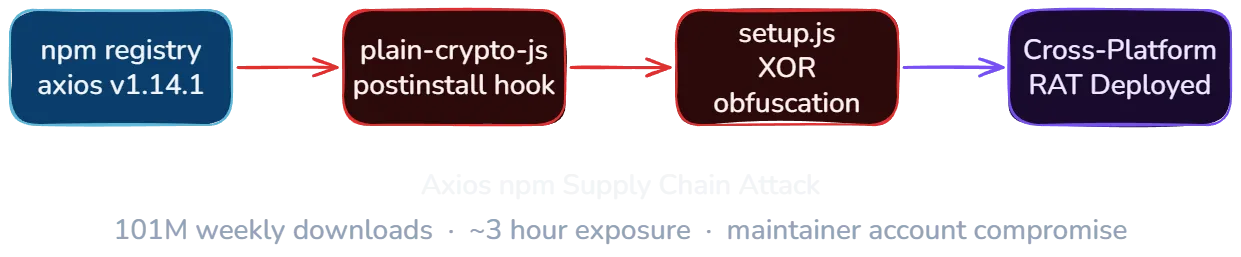
On March 31, 2026, two malicious versions of axios, the most widely used HTTP client in the npm ecosystem with over 101 million weekly downloads, were published to the npm registry. Versions 1.14.1 and 0.30.4 contained a hidden dependency that dropped a cross-platform Remote Access Trojan (RAT) capable of executing arbitrary commands on Windows, Linux, and macOS. The exposure window was roughly three hours before npm pulled both versions.
The attack was not the result of a code vulnerability in axios. An attacker compromised the npm account of axios lead maintainer Jason Saayman, stole a classic npm access token, and used it to publish the malicious versions directly, bypassing the GitHub Actions OIDC pipeline that axios normally uses for releases. The compromise was discovered independently by Elastic Security researchers and StepSecurity.
Timeline of events
| Date (UTC) | Event |
|---|---|
| Mar 27, 19:01 | [email protected] published legitimately via GitHub Actions OIDC with SLSA provenance attestations |
| Mar 30, 05:57 | [email protected] published (clean decoy package, establishing the name on npm) |
| Mar 30, 23:59 | [email protected] published with malicious postinstall hook |
| Mar 31, 00:21 | [email protected] published by compromised account, tagged as latest |
| Mar 31, 01:00 | [email protected] published by compromised account, tagged as legacy |
| Mar 31, 01:38 | DigitalBrainJS (axios co-maintainer) creates deprecation PR, attempts damage control |
| Mar 31, 01:48 | Joe Desimone (Elastic Security) publishes full technical analysis as GitHub Gist |
| Mar 31, 03:00 | Ashish Kurmi (StepSecurity) files GitHub issue #10604 |
| Mar 31, ~03:15 | npm unpublishes both malicious axios versions and initiates security hold on plain-crypto-js |
| Mar 31, 03:40 | DigitalBrainJS confirms: npm administration responded, all compromised versions and tokens removed |
The attacker targeted both the current release branch (1.x, latest tag) and the legacy branch (0.x, legacy tag) simultaneously, maximizing the number of affected installations across projects still using the older API.
How the attack worked
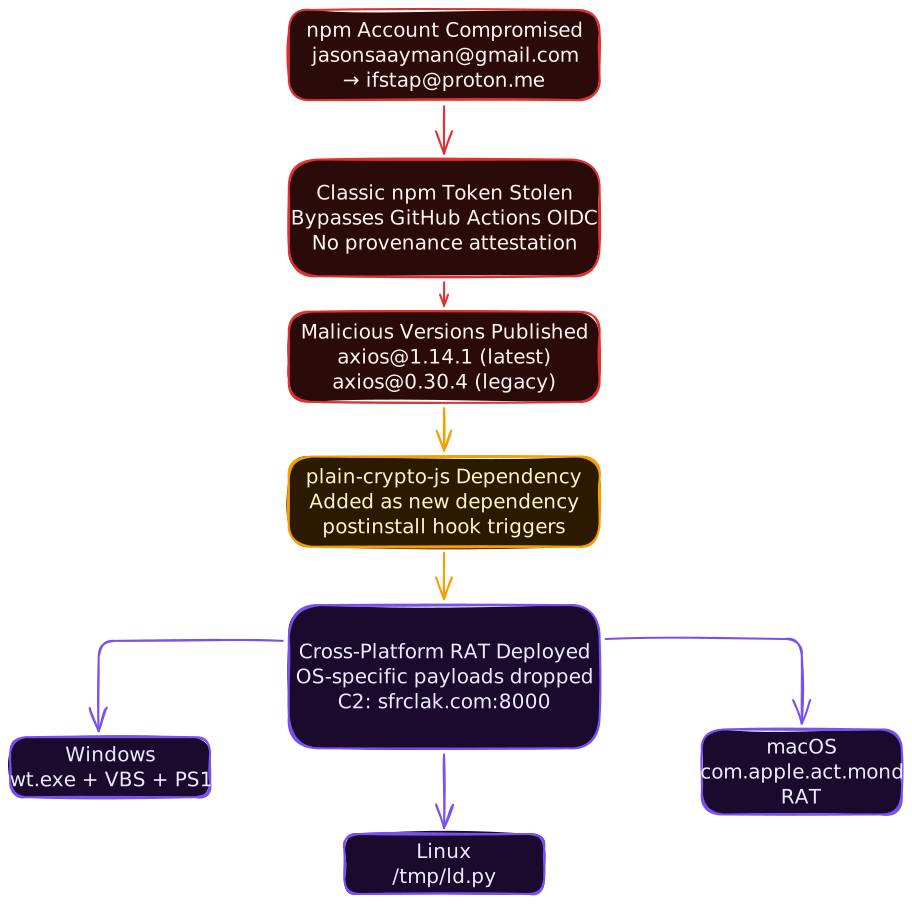
The attacker gained access to the npm account of Jason Saayman (jasonsaayman), the lead maintainer of axios. The account’s registered email was changed from [email protected] to [email protected], an attacker-controlled Proton Mail address.
With control of the account, the attacker published the malicious versions using a stolen classic npm access token. This is the critical detail: the legitimate [email protected], published just four days earlier, went through GitHub Actions OIDC with SLSA provenance attestations. The malicious versions had no OIDC binding, no provenance, no gitHead field, and no corresponding GitHub commit or tag.
As Huntress noted, even on the v1.x branch where OIDC Trusted Publishing was configured, the publish workflow still passed NPM_TOKEN as an environment variable alongside the OIDC credentials. When both are present, npm uses the token. This meant the stolen classic token was effective despite OIDC being configured.
The malicious versions introduced a single change: a new dependency on plain-crypto-js@^4.2.1. This package had been staged the day before. Version 4.2.0 was published first as a clean decoy to establish the package name on npm, followed by version 4.2.1 with the actual malicious payload roughly 18 hours later.
The co-maintainer DigitalBrainJS (Dmitriy Mozgovoy) described the situation in the GitHub issue: the compromised account had higher permissions than his own. He could not revoke access, and any fix he pushed could be overwritten. npm registry intervention was the only resolution.
The payload: cross-platform RAT
The malicious [email protected] package contained a postinstall hook that executed node setup.js automatically during npm install. The setup.js script was obfuscated with two layers: string reversal combined with base64 encoding, then XOR cipher using the key OrDeR_7077 with a position-dependent index formula (7 * i^2 % 10).
After deobfuscation, the script detected the host operating system and dropped a platform-specific RAT payload.
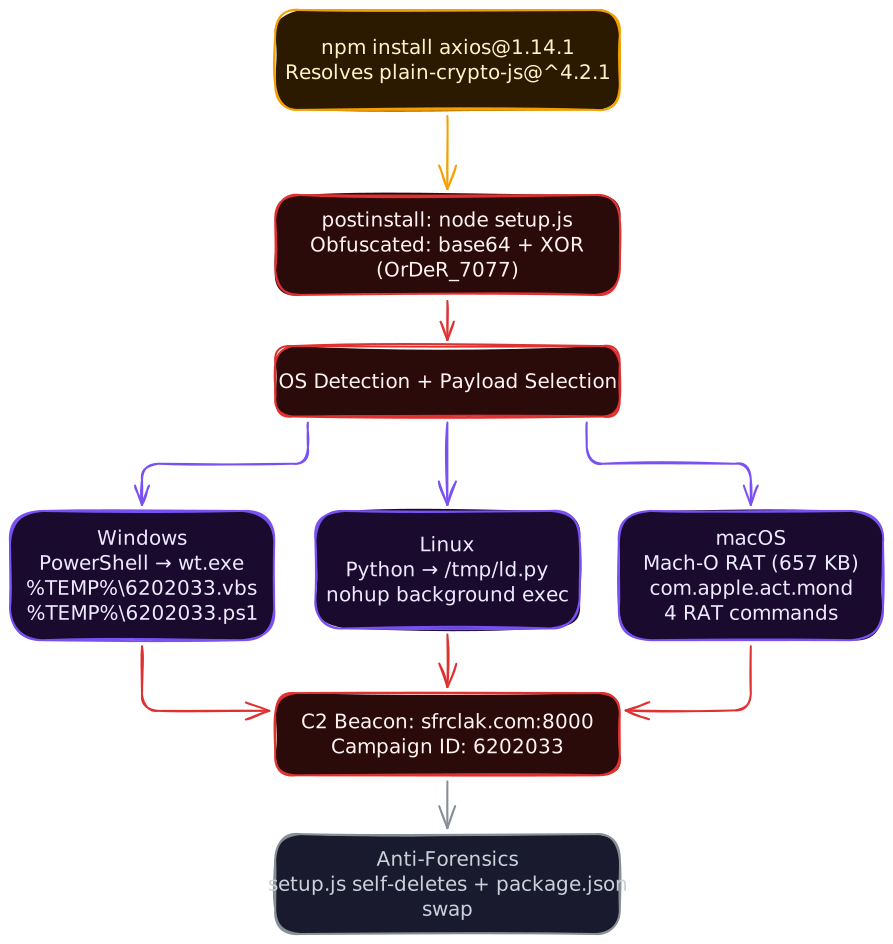
macOS payload. The macOS dropper used AppleScript to write a 657 KB Mach-O binary (x86_64) to /Library/Caches/com.apple.act.mond, disguised as an Apple system daemon. The RAT collected hostname, username, macOS version, timezone, CPU type, and running processes (ps -eo user,pid,command), then beaconed to the C2 server every 60 seconds via HTTP POST with a fake Internet Explorer 8 user agent. It supported four commands from the C2:
peinject: download, code-sign, and execute arbitrary binariesrunscript: execute shell commands or AppleScriptrundir: enumerate/Applicationsand~/Librarykill: terminate the RAT process
All exfiltrated data was Base64-encoded before transmission.
Windows payload. The Windows dropper copied PowerShell to %PROGRAMDATA%\wt.exe (masquerading as Windows Terminal), then dropped a VBScript loader and PowerShell payload to %TEMP%\6202033.vbs and %TEMP%\6202033.ps1. The VBScript executed the PowerShell script in a hidden window.
Linux payload. The Linux dropper downloaded a Python script to /tmp/ld.py and executed it via nohup python3 in the background, detaching from the terminal session.
Anti-forensics
The setup.js script included self-cleaning mechanisms designed to erase evidence of the compromise after payload delivery. Immediately after dropping the platform-specific RAT, the script deleted itself using fs.unlink(__filename). It also renamed a pre-staged clean file (package.md) to package.json, overwriting the malicious package.json that contained the postinstall hook.
The result: inspecting node_modules/plain-crypto-js/ after installation showed no trace of the compromise. The package.json appeared clean, the setup.js no longer existed, and only the benign decoy files remained.
Indicators of compromise
If any system in your environment ran npm install while either malicious version was tagged as latest or legacy (approximately 00:21 to 03:15 UTC on March 31), check for these artifacts.
Command and control infrastructure:
sfrclak.com:8000(C2 server, campaign ID6202033)- IP:
142.11.206.73
Attacker accounts:
[email protected](compromised jasonsaayman npm account)[email protected](plain-crypto-js publisher)
Malicious package hashes (SHA1):
[email protected]:2553649f232204966871cea80a5d0d6adc700ca[email protected]:d6f3f62fd3b9f5432f5782b62d8cfd5247d5ee71[email protected]:07d889e2dadce6f3910dcbc253317d28ca61c766
What to do now
Immediate: check for exposure
- Verify whether any system ran
npm installbetween 00:21 and 03:15 UTC on March 31. Checkpackage-lock.jsonhistory, CI/CD build logs, and Docker image layers. - Search for the filesystem artifacts listed above on all potentially affected hosts.
- Check DNS logs and firewall logs for connections to
sfrclak.comor142.11.206.73. - If your organization uses a private npm mirror or proxy (Verdaccio, Artifactory, GitHub Packages), check whether it cached the malicious versions during the exposure window.
Short-term: contain and remediate
- If any IOCs are found, treat the host as fully compromised. The RAT supported arbitrary command execution, file enumeration, and binary injection. Assume the attacker had full control of any compromised machine.
- Rotate all credentials, API keys, tokens, and SSH keys that were present on affected systems.
- Pin axios to v1.14.0 (confirmed safe) and verify package checksums.
- Remove
plain-crypto-jsfromnode_modulesif present:npm uninstall plain-crypto-js. - Clean npm cache:
npm cache clean --force. - Rebuild any Docker images or CI/CD environments from scratch with clean dependencies rather than patching in place.
Ongoing: harden your supply chain
- Use lockfiles and
npm cifor all installations. Lockfiles pin exact versions.npm cirespects the lockfile strictly and fails if it is out of sync, preventing silent resolution of new malicious versions. - Set a minimum release age. Running
npm config set min-release-age 3rejects packages published less than 3 days ago. This would have blocked both malicious versions, which were published and pulled within hours. - Switch to granular npm access tokens. Classic tokens have full account access. Granular tokens can be scoped to specific packages, restricted to specific IP ranges, and set to read-only. If your organization publishes to npm, audit your token inventory today.
- Enable npm provenance for your packages. Provenance attestations link published packages to specific CI/CD runs and source commits, making unauthorized publishes detectable.
- Monitor for dependency changes in pull requests. Automated tools like Socket, Snyk, or Dependabot can flag newly added or changed dependencies before they reach production.
The bigger picture for MSPs
Axios is foundational infrastructure for JavaScript applications. Over 108,000 GitHub repositories depend on it directly, and the transitive dependency count is orders of magnitude higher. It is the default HTTP client in many frameworks, starter templates, and enterprise applications. When a package at this scale is compromised, the blast radius is not theoretical.
For MSPs managing client environments with JavaScript workloads, this incident highlights several realities:
The npm token model has a critical gap. Axios had adopted best practices: GitHub Actions OIDC publishing, SLSA provenance attestations, trusted publisher workflows. None of that mattered because the publish workflow passed NPM_TOKEN alongside OIDC credentials, and npm defaults to the token when both are present. The stolen classic token allowed the attacker to publish directly via CLI. The security of any npm package is only as strong as the weakest authentication method available to its maintainers.
Three hours is enough. The malicious versions were available for roughly three hours before npm pulled them. On a package with 101 million weekly downloads, even a brief window means thousands of installations. Huntress reported that the first infection in their partner base occurred just 89 seconds after [email protected] was published, triggered by automated CI/CD pipelines. Across the three-hour exposure window, at least 135 endpoints in the Huntress partner network contacted the attacker’s C2 server. If any of your clients’ CI/CD pipelines, developer workstations, or deployment scripts ran npm install during that window, they may be affected.
Anti-forensics make detection harder. Unlike most npm supply chain attacks where inspecting node_modules reveals the malicious code, this attack cleaned up after itself. The postinstall script deleted itself and replaced the malicious package.json with a clean copy. Detection requires checking for the stage-2 payload artifacts (the RAT binaries) or network connections to the C2 server, not the package contents.
Two attacker accounts, staged over 24 hours. The attacker used a separate account ([email protected]) to publish the payload package, and staged the clean decoy version a full day before the malicious version. This level of planning suggests preparation, not opportunism.
Key takeaways
- Classic npm tokens override OIDC when both are present. The axios publish workflow passed
NPM_TOKENalongside OIDC credentials, and npm defaults to the token. Audit your CI/CD workflows for this pattern, remove classic tokens where OIDC is configured, and switch to granular access tokens with IP restrictions. - The payload was a full RAT, not a data exfiltrator. The macOS binary supported arbitrary command execution, binary injection, and system enumeration. This was not a one-shot credential stealer. Compromised hosts should be treated as fully controlled.
- Anti-forensics erased the evidence from node_modules. Post-install inspection shows no trace of the compromise. Detection requires checking for stage-2 artifacts (dropped binaries, scripts) and network indicators (C2 domain, IP).
- Both release branches were targeted simultaneously. The attacker published to
latest(1.x) andlegacy(0.x) dist-tags, catching both current and legacy consumers. - A minimum release age policy would have blocked this. Running
npm config set min-release-age 3rejects packages less than 3 days old. Both malicious versions were published and pulled within hours. - Lockfiles plus
npm ciprevent silent version resolution. If your lockfile pinned [email protected], runningnpm ciwould not have resolved 1.14.1. This only applies if you usenpm ciconsistently, notnpm install.
Related reading
LiteLLM Supply Chain Attack: What MSPs Need to Know
Analysis of the TeamPCP supply chain attack on LiteLLM via compromised Trivy GitHub Actions, covering the 3-layer payload, IOCs, and defensive actions for MSPs.
Huntress 2026 Cyber Threat Report: Key Findings for MSPs
Analysis of the Huntress 2026 Cyber Threat Report covering identity compromise, RMM abuse, ClickFix loaders, ransomware timelines, and a 30-day action plan.